 Mr Kidman's Classroom


Revise the key ideas
Number sets, counting and measurement
- Natural and integer numbers — The course uses ℕ={0,1,2,…} for natural numbers and ℤ={…,−2,−1,0,1,2,…} for integers. Natural numbers suit counts of whole items; integers also represent signed differences. A storage type such as VB.NET Integer has a finite range, unlike the mathematical set ℤ, which has no largest or smallest member.
- Rational numbers — A rational number can be written p/q with integer p,q and q ≠ 0. Every integer is rational because n=n/1. A rational decimal can terminate or recur, such as 0.5=1/2 and 0.333…=1/3. A recurring decimal is not automatically irrational merely because its printed expansion never ends.
- Irrational and real numbers — Irrational values such as√2 cannot be expressed as a ratio of integers. The real numbers include rational and irrational values and can model measured quantities on a continuous scale. A finite digital representation approximates many real values; mathematical inclusion in ℝ does not imply exact storage in a finite floating-point type.
- Ordinal positions and measurements — An ordinal describes ordered position, such as first or third, rather than a quantity of objects. A count of candidates is discrete, while measured time or distance may be modelled with real values subject to uncertainty and resolution. A displayed integer measurement can still be a rounded reading rather than proof the underlying quantity changes only in whole units.
Positional bases and information units
- Base and place value — A positional base b uses digit values 0 through b−1, with integer place weights …,b²,b,1. Binary uses 0/1, decimal 0–9 and hexadecimal 0–9/A–F for values 0–15. Mark the base or context: 1010₂ is ten decimal, while 1010₁₀ is one thousand and ten.
- Binary-decimal conversion — 101101₂ =32+8+4+1=45₁₀. To encode a nonnegative integer, select descending binary place weights or repeatedly divide by 2 and reverse the remainders. Show the resulting bit width and leading zeros where a field format requires them, rather than interpreting extra leading zeros as extra magnitude.
- Hexadecimal shorthand — One hexadecimal digit corresponds exactly to four binary bits. 1001 1011₂ becomes 9B₁₆, which is 9×16+11=155₁₀. Group from the binary point in fours, padding the outer group with zeros if appropriate. Hexadecimal shortens the written representation; it does not compress the underlying stored bit pattern by itself.
- Bits, bytes and possibilities — A bit has two possible values, and a byte contains eight bits. n independent bits have 2ⁿ possible patterns; three bits give eight patterns, while eight bits give 256. Pattern count is not automatically the maximum represented number: an unsigned n-bit field's maximum is 2ⁿ−1 because zero uses one pattern.
- Minimum field width — Choose the smallest n with 2ⁿ at least the number of distinct codes required. To identify 300 candidates using a fixed binary code, eight bits provide only 256 patterns while nine provide 512, so nine bits are needed before any reserved-code requirement. Do not round log₂300 down or confuse 300 patterns with a maximum value of 300.
- Decimal storage prefixes — Use 1 kB = 10³ B, 1 MB = 10⁶ B, 1 GB = 10⁹ B and 1 TB = 10¹² B under decimal prefixes. Capital B denotes bytes; lower-case b commonly denotes bits. A 10 MB uncompressed file contains 80 million bits, so transferring at a stated 10 megabits per second has an ideal payload time 8 s before overhead and other constraints.
- Binary storage prefixes — Binary prefixes are 1 KiB = 2¹⁰ B = 1024 B, 1 MiB = 2²⁰ B, 1 GiB = 2³⁰ B and 1 TiB = 2⁴⁰ B. 1 MiB is 1,048,576 B, larger than 1 MB. Historical use of KB/MB for binary quantities is ambiguous; state the conversion convention rather than silently swapping 1000 and 1024 halfway through a calculation.
Unsigned arithmetic and two's-complement integers
- Unsigned interpretation — An unsigned n-bit integer has place weights 2ⁿ⁻¹ down to 1, giving range 0 through 2ⁿ−1. An unsigned eight-bit byte ranges 0–255. A bit pattern does not announce whether it is signed, text or colour; the agreed format determines how those bits are interpreted.
- Binary addition — Add column by column with carry: 1+1 gives result 0 carry 1, while 1+1+1 gives result 1 carry 1. For example 001101₂ + 000111₂ = 010100₂, or 13+7=20. Retain a sufficiently wide result and identify any carry outside a fixed field rather than losing it unnoticed.
- Binary multiplication — Multiply using shifted partial products for each 1 bit in the multiplier. 1101₂×0101₂ gives 1101 +110100 =1000001₂, or 13×5=65. A left shift multiplies an unsigned mathematical value by 2 only while the required bits remain representable; truncating a fixed-width high bit can change the actual stored result.
- Unsigned overflow — With eight unsigned bits, 200+100=300 cannot fit the 0–255 range. The low eight result bits represent 44 with an extra carry, so accepting only those bits without an overflow policy loses the intended mathematical value. Widening before calculation, rejecting the operation or a documented modular model are different choices.
- Two's-complement weights — An n-bit two's-complement integer has a negative most-significant weight −2ⁿ⁻¹ and ordinary positive remaining weights. Its range is −2ⁿ⁻¹ through 2ⁿ⁻¹−1; eight bits cover −128 through 127. It has one zero pattern and an asymmetric positive/negative magnitude range.
- Encoding a negative integer — For a supported magnitude in a declared fixed width, invert the positive bit pattern and add 1 to obtain its negative. At eight bits, +18 is 00010010, so −18 is 11101110. Verify with the weights or decode an unsigned pattern value 238 as 238−256=−18; the leading 1 is part of the numeric representation, not a separate minus character.
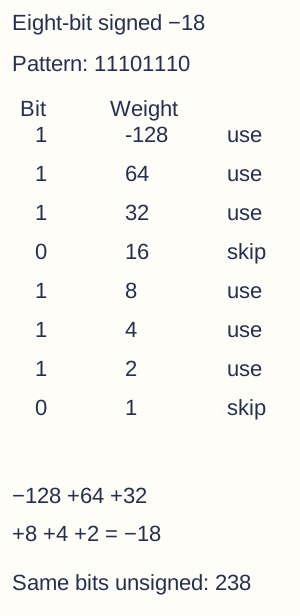
Eight-bit 11101110 interpreted in two's complement uses the negative leading weight -128 plus 64,32,8,4,2, giving -18. Weights 16 and 1 have zero bits. The unsigned interpretation 238 differs because it assigns a positive leading weight; the pattern needs a declared format. - Subtraction through addition — Compute A−B by adding A to B's two's-complement negative in the same width. For 23 − 37, 00010111 + 11011011 = 11110010, interpreted as −14. For 37 − 23, 00100101 + 11101001 gives a ninth carry and low byte 00001110, or 14. Carry outside the width is discarded in this modular step but must not be confused with signed-overflow detection.
- Signed overflow — Adding two same-sign operands and obtaining the opposite sign indicates signed overflow in a fixed two's-complement width. Eight-bit 100+60 has mathematical result 160 but low bits 10100000 interpreted as −96. A final carry is not a universal signed-overflow test; check representable range or the appropriate sign/carry rule for the stated arithmetic.
- Sign extension — To extend a two's-complement integer without changing its value, copy the sign bit into the new high positions. Eight-bit 11101110 becomes sixteen-bit 11111111 11101110 for −18. Zero-padding that negative pattern instead would turn it into positive 238 under the new signed width; unsigned extension uses a different interpretation.
Fixed-point binary fractions
- Fractional place weights — To the right of a binary point, weights are 1/2,1/4,1/8,1/16,… . Thus 101.011₂ =5+1/4+1/8=5.375. Convert a fractional part by repeatedly multiplying by 2 and recording the successive integer parts, retaining only the permitted number of fractional bits with the declared rounding rule.
- Fixed-point format — A fixed-point representation gives the binary point a fixed position under the agreed format. In a signed eight-bit field with four fractional bits, interpret the raw two's-complement integer and divide by 16. The range is −8 through 7.9375 in steps of 1/16; the binary point position is metadata/convention, not necessarily an extra stored character bit.
- Fixed-point worked encoding — In that signed eight-bit/four-fraction-bit format, 5.375×16=86, encoded 01010110 and displayed 0101.0110. For −2.25, scale to −36, encode 11011100 and display 1101.1100. Decode the complete signed pattern before scaling; treating the leftmost sign bit as an ordinary positive weight gives a different value.
- Precision versus range — More fractional bits at a fixed total width give smaller representable steps but reduce integer range. More integer bits extend range but coarsen fractional steps. Fixed-point arithmetic can suit predictable bounded quantities and simple scaling, but multiplication/division must handle scale factors and intermediate overflow correctly rather than blindly treating encoded integers as unscaled reals.
- Why decimal fractions can be inexact — A finite binary fraction has a denominator that is a power of 2 after simplification. 0.1₁₀=1/10 includes a factor 5 in its denominator, so its binary expansion recurs and cannot be stored exactly in finitely many ordinary binary fraction bits. Some rational values are exact, such as 0.125=1/8; irrational values are also not exactly expressible by a finite bit fraction.
- Rounding and truncation errors — Keeping only a finite number of fractional bits forces a choice such as truncation or rounding to a nearby representable value. In an unsigned five-fraction-bit format, truncating 0.1 to 0.00011₂ gives 0.09375. A different bit width or rounding rule gives a different approximation; the error is not proof the input value itself changed mathematically.
- Absolute and relative error — Absolute error is the magnitude of stored minus reference value. For reference 0.1 and stored 0.09375 it is 0.00625; relative error is 0.00625/0.1=0.0625, or 6.25%. Relative error divides by the magnitude of the reference, and is undefined for a zero reference under this formula. The same absolute error has a greater relative effect on a small nonzero magnitude than a large one.
Floating point, normalisation and representable limits
- Simplified floating format — Use value = mantissa ×2ᵉˣᵖᵒⁿᵉⁿᵗ. The mantissa supplies the significant signed fraction; the exponent states how far to scale it by powers of two. AQA uses simplified formats in which both mantissa and exponent are two's complement; the mantissa's binary point is placed as specified, commonly immediately after its sign bit. These examples are not IEEE 754 bit fields, and do not introduce an implicit leading bit or a biased exponent into a question that specifies signed fields.
- Decoding a worked float — With eight mantissa bits and four exponent bits, let mantissa 01010000 mean 0.1010000₂=0.625 and exponent 0011 mean +3. The value is 0.625×2³=5. For exponent 1110, decode it as −2, so the same mantissa represents 0.625×2⁻²=0.15625. Exponent bits are an integer, not another fractional mantissa.
Decode the declared signed fields — Original executed VB.NET fragment inside a module with Option Strict On and System/System.Text imports. Field widths, alphabet and permitted inputs are explicit teaching assumptions.
Public Function SignedValue(bits As String) As Integer If bits.Length = 0 OrElse bits.Length > 30 Then Throw New ArgumentException("Bit width") Dim raw As Integer = 0 For Each bit As Char In bits If bit <> "0"c AndAlso bit <> "1"c Then Throw New ArgumentException("Binary input") raw = raw * 2 + If(bit = "1"c, 1, 0) Next If bits(0) = "1"c Then raw -= CInt(2 ^ bits.Length) Return raw End Function Public Function FixedValue(bits As String, fractionalBits As Integer) As Double If fractionalBits < 0 OrElse fractionalBits >= bits.Length Then Throw New ArgumentException("Point position") Return SignedValue(bits) / (2 ^ fractionalBits) End Function Public Function FloatValue(mantissa As String, exponent As String) As Double ' Point immediately after mantissa sign; exponent is a signed integer. Return FixedValue(mantissa, mantissa.Length - 1) * (2 ^ SignedValue(exponent)) End Function - Encoding positive and negative values — For 6.5, write 110.1₂=0.1101000₂×2³, giving mantissa 01101000 and exponent 0011 in the example widths. For −6.5 the signed fractional mantissa is 1.0011000₂=−0.8125, giving 10011000 with the same exponent 0011. Negating a positive floating value changes the mantissa correctly under its signed format rather than simply prefixing a printed minus sign to unchanged bits.
- Normalised leading bits — Under a two's-complement mantissa with point after the sign bit, a nonzero normalised positive mantissa starts 01 and a normalised negative starts 10. This removes redundant leading sign bits and uses available fraction precision. Zero needs a separate representation convention and cannot acquire a nonzero leading pattern just to satisfy the usual normalisation test.
- Positive normalisation trace — Unnormalised 0.0011000₂×2⁵ equals 0.1875×32=6. Shift the mantissa left twice to 0.1100000₂ and decrease exponent from 5 to 3, preserving 6. Moving the point/bit pattern without compensating the exponent changes the value; state the mantissa width and ensure the shifted result fits.
- Negative normalisation trace — Unnormalised 1.1110000₂ is −0.125, so with exponent 5 it represents −4. Shift left through the redundant leading 1 bits three places to 1.0000000₂=−1 and decrease exponent to 2, still representing −4. Use signed fractional weights rather than interpreting every leading 1 as a positive whole-number digit.
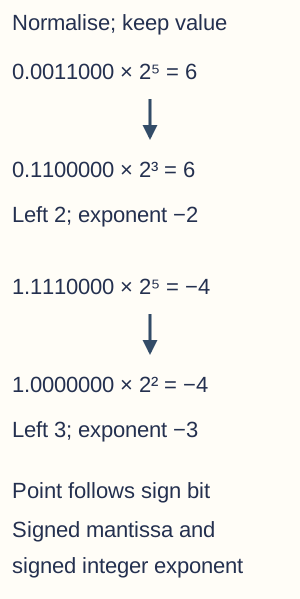
Positive and negative normalisation under the stated eight-bit signed fractional mantissa. Left-shifting 0.0011000 twice and reducing exponent 5 to 3 preserves 6. Left-shifting 1.1110000 three times and reducing exponent 5 to 2 preserves -4. The mantissa is two's complement with point after its sign; this is not IEEE 754. - Exponent range and mantissa precision — At fixed total bits, more exponent bits generally extend the magnitude range, while more mantissa bits allow finer precision within a given exponent scale. Floating-point spacing varies with exponent, unlike a uniformly scaled fixed-point field. More exponent range does not make every nearby pair of large values distinguishable.
- Overflow and underflow — Overflow occurs when a required magnitude exceeds the format's representable range. Underflow concerns a nonzero magnitude too small for its supported nonzero representation, potentially rounded to zero or handled under another stated policy. In the simplified normalised format, do not assume IEEE subnormal handling or infinities unless a question explicitly defines them.
- Worked format limits — For the stated eight-bit mantissa and four-bit exponent with normalisation, the largest positive mantissa is 0.1111111₂=127/128 and largest exponent 7, giving 127. The most negative mantissa −1 with exponent 7 gives −128. The smallest positive normalised value uses 0.5×2⁻⁸=1/512. These results depend on the stated signed fields and point position.
- Arithmetic and rounding accumulation — Floating addition aligns exponents, which can shift low-significance mantissa bits out of the available width; results may need normalisation and rounding. Repeated operations can accumulate error, and changing grouping can change a rounded result. Floating arithmetic represents a finite approximation model, so exact-looking decimal equality and mathematical associativity cannot be assumed for every implementation.
- Choosing fixed or floating point — Compare required range, absolute/relative precision, scaling, intermediate results and supported arithmetic hardware. Fixed point can suit bounded scaled values; floating point can cover wide varying magnitudes with scale-dependent precision. Neither guarantees exact arbitrary real-number storage, and speed depends on the implementation and available hardware rather than an unconditional ranking.
Character codes and error detection or correction
- Character digit versus number — The character '5' is a symbol with an encoding code, whereas numeric 5 is a quantity. ASCII '5' has code 53, binary 00110101 in an eight-bit container, while unsigned numeric 5 is 00000101. Displaying the same visible glyph after formatting does not mean the underlying data type or encoded pattern is identical.
- ASCII scope — Standard ASCII defines 128 codes in seven bits, including letters, digits, punctuation and control characters. An eight-bit storage byte can hold an ASCII code, but many different extended eight-bit code pages exist; there is not one universal extended-ASCII mapping for every language. Code value and encoding must be specified when interpreting bytes.
- Unicode and encodings — Unicode assigns code points to a much broader character repertoire for multilingual text. UTF-8 and UTF-16 are encoding forms, not separate competing character alphabets: UTF-8 uses one to four bytes per Unicode scalar value, while UTF-16 uses one or two 16-bit code units. A visible grapheme, a user-perceived character such as a letter with its accents, can contain multiple code points, so Unicode does not mean every displayed character always occupies exactly two bytes.
- Parity bit — A parity bit makes the number of 1 bits in a transmitted/checkable block even or odd under the chosen convention. Data 1011001 contains four ones, so append 0 for even parity or 1 for odd parity. The receiver recomputes the parity rule; sender and receiver must agree which bits form the checked block.
- Parity limitations — A single flipped bit changes parity and can be detected, but an even number of flipped bits can leave the parity unchanged. Ordinary one-bit parity does not identify which bit was wrong and cannot alone correct arbitrary errors. Passing the parity check is therefore evidence of no detected violation, not proof the data is intact.
- Majority voting — Repeated transmission can allow a receiver to choose the majority value, such as receiving 1,0,1 and deciding 1 for a tripled bit. This can correct one error within that three-copy group but fails if at least two copies are wrong. It increases transmitted data and relies on an appropriate error model; repeating data is not a free guarantee against every correlated fault.
- Checksums — A checksum combines a data block under a declared algorithm and transmits/stores the resulting check value for comparison. In a toy sum-of-bytes modulo 256 scheme, 17+240+10=267 gives checksum 11. This particular sum can miss reordering or compensating changes; stronger real algorithms have different properties, so do not assign this toy rule to every checksum.
- Check digits — A check digit is calculated from an identifier's other digits under an agreed rule to catch some entry/transmission errors. For a deliberately simple toy digit-sum-to-multiple-of 10 scheme, identifier digits 1,2,3 need check digit 4. Real identifiers often use weighted schemes; validation checks format consistency, not whether the identifier was legitimately issued or belongs to the user presenting it.
Bitmaps, vectors and analogue or digital conversion
- Bit patterns need interpretation — The same bytes can represent numeric fields, text codes, pixel channels, sampled amplitudes or instructions under different formats. A file's header/metadata and its agreed specification determine interpretation. A collection of bytes is not inherently a picture or a sound merely because a program opens it with an image or audio tool.
- Analogue and digital distinction — An analogue representation or signal varies continuously over the relevant range, while a digital representation uses discrete symbols or levels. A continuous physical quantity can be sampled and quantised into digital data. Do not confuse continuous time with continuous amplitude: both dimensions and the declared signal model matter.
- ADC stages — An analogue-to-digital converter samples an analogue signal at chosen times and quantises each measured amplitude to one of finitely many levels, encoded as bits. Analogue sensors can feed an ADC after suitable conditioning/filtering. Sampling rate controls time spacing; bit depth controls the available amplitude levels, so increasing one does not automatically improve the other.
- DAC principle — A digital-to-analogue converter produces corresponding analogue output levels from digital samples, with suitable reconstruction/filtering for the intended signal. Digital audio playback commonly uses a DAC before amplification and a transducer, such as a loudspeaker that changes an electrical signal into sound. It cannot restore information that was never captured or was irreversibly removed by quantisation or lossy processing.
- Bitmap representation — A bitmap stores a grid of pixel values with declared dimensions, layout and colour interpretation. Colour depth is bits per pixel in the simplified direct-storage model; n bits allow up to 2ⁿ distinct codes. An indexed palette or extra alpha/transparency data changes the format accounting, so use the given assumptions rather than assuming every image stores three 8-bit channels.

An original six-by-six pixel image uses four palette codes. At two bits per index its raw index grid is 72 bits, or 9 bytes; the colour palette and format metadata are additional and excluded from that calculation. The enlarged visible cells explain a raster grid rather than implying the example contains photographic detail. - Image dimensions and resolution — Pixel dimensions are width×height, such as 640×480, while spatial resolution can mean pixels per inch for a specified physical display/print size. Some resources also use resolution informally for total pixel dimensions; state which meaning is intended. More pixels spread over the same physical area can represent finer spatial detail but cannot create original detail from an already coarse source by simple enlargement.
- Bitmap storage calculation — Ignoring headers, padding and compression, raw bits =width pixels×height pixels×bits per pixel. A 640×480 image at 24 bits per pixel needs 7,372,800 bits = 921,600 B = 900 KiB. Divide by 8 to convert bits to bytes and state whether the result uses decimal or binary prefixes; metadata makes a real file potentially larger.
- Metadata and interpretation — Typical image metadata can include dimensions, colour depth, colour model/profile and format-specific layout or compression details. Some formats also retain descriptive or creation information. Metadata is not the entire pixel array and not automatically trustworthy evidence that a stored image was captured at a particular event.
- Vector graphic objects — A vector graphic stores geometric objects and properties rather than only a final fixed pixel grid. A circle can be described by centre coordinates, radius, fill and stroke; a line by endpoints, width and colour. Rendering those instructions produces pixels at a chosen output size, so a screen still displays a rasterised result even when the source is vector-based.
- Creating and scaling primitives — A local SVG can combine a rectangle, line and circle with explicit coordinates and styles to form a simple original graphic. Scaling its geometric coordinates can retain smooth shape boundaries at the new rasterisation resolution. Stroke widths, text and imported bitmap elements can have their own rules; not every content detail becomes infinitely precise merely because the outer file is SVG.
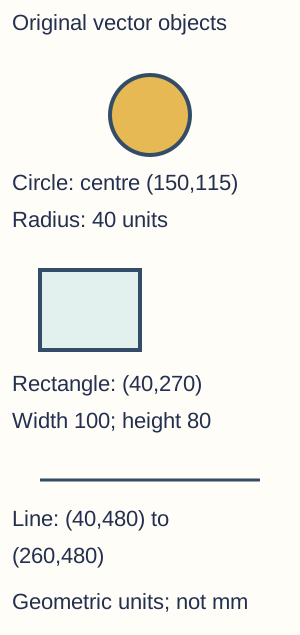
Original local SVG constructed from a circle, rectangle and line. The circle centre is (150,115), radius 40; rectangle origin (40,270), width 100, height 80; line endpoints (40,480) and (260,480). Fill/stroke are object properties. Coordinates are SVG drawing units, with positive y downward, not claims about a physical millimetre size. - Choosing bitmap or vector — Bitmaps suit detailed continuous-tone photographs and pixel editing; vectors suit logos, diagrams and geometric artwork with reusable object structure. A complex vector scene is not always smaller or faster to render than a bitmap. Compare content, editing, scaling and output needs, and distinguish converting storage format from recreating lost image detail.
Sampled sound, Nyquist and MIDI
- Samples and amplitude levels — Uncompressed sampled audio records amplitude values at regular time intervals per channel. Sampling rate is samples per second per channel, while sample resolution/bit depth determines the number of encoded amplitude levels. Sixteen-bit samples provide 65,536 codes, not 65,536 samples per second or an automatic 65,536 Hz audible range.
- Sampling rate and Nyquist — For ideal reconstruction of a band-limited signal, one containing no frequencies above a specified limit, the sample rate must exceed twice its highest frequency, with appropriate anti-alias filtering in practice. At 44,100 samples/s the Nyquist boundary is 22,050 Hz; equality at that boundary is not a robust general capture guarantee. The theorem concerns temporal frequency and assumptions, not a promise of perfect reproduction of every real recording.
- Aliasing and quantisation — Insufficient rate or missing anti-alias filtering can make different input frequencies produce indistinguishable sampled patterns, giving aliasing. Finite amplitude levels introduce quantisation error even when the rate is high enough. Increasing bit depth reduces the amplitude step under the model; increasing rate improves temporal sampling but does not by itself add amplitude codes.

One schematic normalised sine cycle with five sample instants and eight possible amplitude levels. Orange dots are nearest-level quantised sample values; exact zero is a tie rounded to the positive adjacent level in this illustration. Blue curve is the source model, not a line reconstructed merely by joining encoded samples. Rate and amplitude depth constrain different dimensions; this is not a measured recording or an aliasing proof. - Sound-size calculation — For uncompressed fixed-width samples, bytes=sample rate×bits per sample×channels×duration/8. Ten seconds of 44,100 Hz, 16-bit stereo uses 1,764,000 B = 1.764 MB before headers. Stereo has two channels under this example; do not multiply by the bit depth twice or treat an encoded compressed bitrate as though it were raw sample depth.
- MIDI event representation — MIDI represents musical performance/control events such as note-on, note-off, pitch, velocity (a note-event value commonly controlling attack strength or loudness), timing and instrument/controller messages. It does not store a sampled waveform of the actual sound in those event messages. A synthesiser or sound source interprets them, so the same event data can sound different with a different instrument implementation.
- MIDI benefits and limits — An event file can be compact and allow changes to tempo, pitch, instrumentation and individual notes without editing a recorded waveform. It is useful for instrument/control sequences but does not directly preserve a spoken voice or all acoustic detail of a performance as raw audio. File size depends on event density and format, rather than the sampled-audio formula.
Compression, repeated runs and dictionary methods
- Why compress — Compression aims to represent information using fewer bits for storage or transfer by exploiting redundancy or discarding selected detail. Text, images and audio can all be compressed under suitable methods. Headers, code tables and processing cost matter; an already compressed or unsuitable small input can become larger rather than smaller.
- Lossless and lossy — Lossless compression permits exact recovery of the original data under the format. Lossy compression discards some original information to gain a smaller or otherwise useful representation, aiming to preserve what matters for its intended use. Text/program data generally needs exact recovery; image/audio use can sometimes tolerate controlled loss, though repeated lossy re-encoding can introduce further degradation.
- Run-length encoding — RLE represents consecutive repeated values by a value/count pair under a declared order and count scheme. AAAAABB can become (A,5),(B,2); decoding repeats each value by its count. Runs must be consecutive, so five scattered As cannot be merged into one run without losing their positions.
- RLE efficiency and format — Under a toy one-byte-symbol/one-byte-count format, a seven-byte AAAAABB input becomes four bytes for its two runs. ABABABAB would need sixteen bytes in that same scheme, larger than its eight-byte input. Large counts need a defined extension or split-run rule, and the notation (A,5) is explanatory text rather than a universal real file encoding.
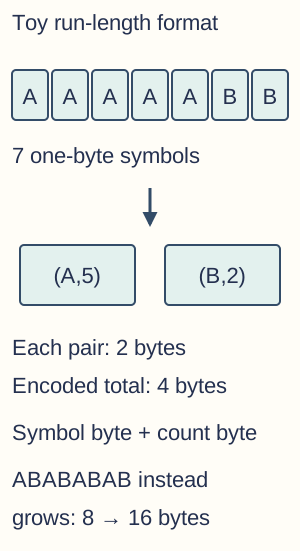
In the explicitly toy one-byte-symbol/one-byte-count scheme, AAAAABB has two runs and encodes into four bytes, versus seven original bytes. Alternating ABABABAB has eight length-one runs and expands from eight to sixteen bytes. Parenthesised notation explains pairs; it is not a claim that punctuation is stored in the toy byte format. - Dictionary-based compression — Dictionary methods replace repeated strings or patterns with shorter references under a shared or reconstructable table. A toy dictionary might assign codes to A, B and AB, allowing repeated AB sequences to use the AB code. Explain how the decoder obtains the table and code boundaries; a bare list of unexplained numbers cannot reconstruct arbitrary original text.
- Dictionary trade-offs and size claims — Some methods transmit a table, while adaptive methods build compatible tables as encoding/decoding proceeds. Include table overhead and code widths when calculating compression; discovering a repeated phrase does not automatically guarantee a net saving. The principle differs from RLE because repeated strings need not be one run of one repeated symbol.
Caesar, Vernam and security assumptions
- Encryption vocabulary — Encryption transforms plaintext into ciphertext using a cipher and key so authorised parties can recover the message under the scheme. Decryption reverses the intended transformation with appropriate key material. Encoding/compression serves representation or size rather than secrecy, and encryption alone does not automatically establish message integrity or the sender's identity.
- Caesar encryption — For a declared uppercase A–Z alphabet numbered 0–25, Caesar shift k maps plaintext index p to (p+k) Mod 26. With k = 3, HELLO becomes KHOOR and Z wraps to C. Preserve or transform spaces/punctuation only under an explicit convention; this toy alphabet rule is not a universal Unicode text-encryption scheme.
Uppercase-only Caesar teaching fragment — Original executed VB.NET fragment inside a module with Option Strict On and System/System.Text imports. Field widths, alphabet and permitted inputs are explicit teaching assumptions.
Public Function Caesar(input As String, shift As Integer) As String ' Contract: uppercase ASCII A-Z only, no punctuation or spaces. Dim output As New StringBuilder() Dim wrappedShift As Integer = ((shift Mod 26) + 26) Mod 26 For Each letter As Char In input If letter < "A"c OrElse letter > "Z"c Then Throw New ArgumentException("A-Z only") Dim position As Integer = AscW(letter) - AscW("A"c) output.Append(ChrW(AscW("A"c) + (position + wrappedShift) Mod 26)) Next Return output.ToString() End Function - Caesar decryption and weakness — Decrypt with (c−k) Mod 26 under a nonnegative wrapping convention. An attacker can try all 26 shifts, or the 25 nontrivial alternatives when a zero shift is excluded, and language patterns reveal candidates. A fixed shift preserves repeated-letter relationships and offers no adequate modern secrecy for meaningful sensitive messages.
- Vernam XOR operation — In a binary Vernam scheme, ciphertext C=P XOR K for equal-length plaintext and key bits. Applying the same XOR key again gives (C XOR K)=P because each key bit cancels. For P=101101 and K=011010, ciphertext is 110111; decrypting 110111 with 011010 restores 101101. XOR is bitwise, not addition with carries.
Bitwise XOR teaching fragment — Original executed VB.NET fragment inside a module with Option Strict On and System/System.Text imports. Field widths, alphabet and permitted inputs are explicit teaching assumptions.
Public Function XorBits(left As String, right As String) As String If left.Length <> right.Length Then Throw New ArgumentException("Equal bit lengths required") Dim output As New StringBuilder() For i As Integer = 0 To left.Length - 1 If (left(i) <> "0"c AndAlso left(i) <> "1"c) OrElse (right(i) <> "0"c AndAlso right(i) <> "1"c) Then Throw New ArgumentException("Binary strings only") End If output.Append(If(left(i) <> right(i), "1"c, "0"c)) Next Return output.ToString() End Function - One-time-pad conditions — A Vernam XOR construction has the one-time-pad perfect-secrecy property when its key is truly uniformly random, secret, independent, at least as long as the message and never reused. A predictable pseudorandom or repeatedly used key does not inherit that guarantee merely because XOR is used. Key generation, secure distribution and one-use management are crucial practical constraints.
- Why key reuse fails — If the same XOR key encrypts P1 and P2, then C1 XOR C2 =P1 XOR P2 because the key cancels. This exposes relationships between messages and can support recovery with other information; it does not mean every pair is instantly completely known with no assumptions. Never call a reused-pad system perfectly secret.
- Perfect versus computational security — Perfect secrecy is an information-theoretic property under the strict pad assumptions. Computational security relies on an adversary lacking a feasible attack within a stated model/resources and correctly implemented key/algorithm use. More computing power, new cryptanalysis or implementation mistakes can change a practical judgement; neither phrase means ciphertext automatically authenticates a sender or prevents endpoint compromise.