 Mr Kidman's Classroom


Revise the key ideas
Data types, values and references
- Choosing a type — A data type determines the values a variable can represent and the permitted operations, not merely its display format. Use Integer for a suitable whole-number count, Double for an approximate real quantity, Boolean for a logical condition, Char for a code unit, String for text and Date/DateTime for a date and time. A numeric-looking identifier with leading zeros may be better represented as text.
- Range and precision — VB.NET Integer is a signed 32-bit type (signed allows negative values, and 32 bits fixes the finite set of available bit patterns), while Long gives a larger signed 64-bit range. Double represents many real quantities approximately in binary, so exact-looking decimal input may not be stored exactly. Decimal can suit defined decimal arithmetic such as money, but does not remove all rounding or range constraints. Choose by required values and precision, not the biggest available type by habit.
- Character versus string — The literal "A"c is a Char while "A" is a String, and an empty string is not the same as a character. A .NET Char is a UTF-16 code unit, one 16-bit part of the encoding used to represent text; some visible characters need more than one code unit. Simple course examples use ordinary characters, but do not claim one Char always equals every complete human-readable symbol.
- Dates as data — A Date value represents date/time data so comparisons and interval calculations can use the intended chronology. A displayed string such as 02/03/2026 depends on a culture/format interpretation and may be ambiguous. Parse using the specified expected format and format deliberately for output rather than assuming alphabetical string order is date order.
- Value types and structures — Assigning a value-type variable copies its value. A user-defined Structure can group related fields, such as a candidate number and score, into a record-like value. Copying a structure with reference-type fields copies those reference values rather than deeply cloning every referenced object, meaning making a separate copy of all those objects too, so value-type copying should not be described as universal independent duplication of an entire object graph.
User-defined value-type fragment — VB.NET with Option Strict On. This fragment belongs inside the original example module; it is not an examination skeleton.
Public Enum EntryState Waiting Complete End Enum Public Structure Candidate Public Code As String Public Score As Integer Public Status As EntryState End Structure - Reference variables and aliases — A class-type variable stores a reference to an object rather than all of its fields inline in the variable. Assigning one reference variable to another can make both refer to the same object; updating that object through one alias (another name referring to that same object) is then visible through the other. Reassigning one variable to a different object does not automatically reassign the other variable.
- Nothing and object creation — Dim item As Counter declares a reference variable, which initially has no Counter object unless assigned. New Counter() constructs an instance, an individual object of that class, and returns a reference; calling an instance member through Nothing can fail. VB.NET manages references without requiring ordinary school examples to manipulate explicit machine addresses, but the conceptual pointer/reference model remains required.
- Arrays and user-defined models — An array groups same-type elements addressed by index, while a record groups named possibly different-type fields for one entity. Dim scores(4) As Integer creates five elements indexed 0 to 4 in VB.NET because the bound is an upper index. An appropriate Structure, Class or enumerated type can model domain meaning instead of spreading related values through unexplained variables.
Declarations, assignment and sequence
- Declarations and initialisation — Dim total As Integer = 0 declares, types and initialises a variable. A declaration establishes what an identifier means; assignment later changes its stored value. Explicit types and Option Strict On help catch inappropriate implicit conversions, changes of type performed automatically without an explicit conversion in the source code. Do not rely on an undeclared name or a default value when an algorithm requires a deliberate starting state.
- Assignment is not algebra — total = total + nextValue evaluates the right side using the current values, then stores the result in total. If total is 5 and nextValue is 3, the new value is 8; it is not an algebraic equation claiming 5 equals 8. In VB.NET the same equals symbol can also appear in a comparison expression, so identify its syntactic role, the job the symbol performs in that particular statement or expression.
- Sequence and tracing — Statements execute in their defined sequence unless control flow changes. For a = 2, then b = a + 3, then a = b * 2, the final values are b = 5 and a = 10. Trace each assignment in order and record values after execution; do not substitute all final values simultaneously into earlier statements.
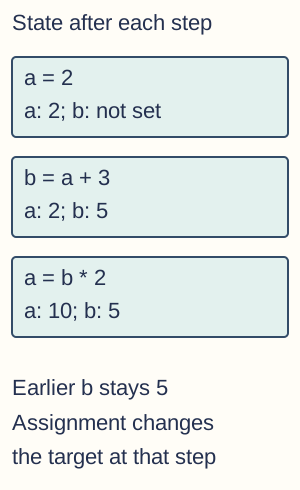
Sequential trace: a becomes 2, b becomes 5, then a becomes 10. The later assignment to a does not update the stored b value. The intermediate label not set describes this teaching trace, not a claim about every language default. - Constants and identifiers — Const MaxAttempts As Integer = 3 gives a meaningful fixed value that cannot be reassigned as a normal variable. Named constants document purpose and make a policy value easier to change consistently than repeated unexplained literals. A variable can change during execution; a constant is not merely a variable whose current value happens not to have changed yet.
- Readable program state — Use identifiers expressing the data's purpose, consistent indentation and appropriate comments explaining intent or non-obvious reasoning. Names such as remainingAttempts and totalCost help trace a method better than x1 or data2. Comments do not compensate for wrong control flow or code that contradicts the stated requirements.
Arithmetic, relations and Boolean logic
- Arithmetic and precedence — VB.NET uses +, −, *, / and ^ for addition, subtraction, multiplication, real division and exponentiation in the usual numeric context. Precedence is the order in which operations are applied: multiplication and division normally occur before addition and subtraction unless brackets change the grouping. Parentheses make intended grouping explicit: (a + b) / 2 differs from a + b / 2. Check operand types and result range, and distinguish numeric addition from text concatenation.
- Integer division and remainder — For Integer operands, 17 \ 5 gives quotient 3 and 17 Mod 5 gives remainder 2, while 17 / 5 gives 3.4. The integer quotient discards the fractional part toward zero; for negative inputs the remainder follows the language's rules rather than a guessed always-positive mathematical modulo. Keep operands explicitly integral: with Option Strict Off, floating operands may be rounded during conversion before integer division.
- Rounding versus truncation — Rounding chooses a nearby value according to a specified rule, while truncation removes the fractional part toward zero. In VB.NET CInt rounds rather than simply truncating, and midpoint conversion uses nearest-even behaviour: when a value is exactly halfway between two integers, it chooses the even integer. CInt(2.5) is 2 and CInt(3.5) is 4. Fix(−2.7) gives −2 while Int(−2.7) gives −3, illustrating truncation versus floor.
- Relational expressions — The comparisons =, <>, <, >, <= and >= produce Boolean results (True or False) for suitable comparable operands. age >= 18 includes 18, while age > 18 excludes it. To test a closed numeric range, write both comparisons and combine them, rather than using an algebra-like chained expression such as 0 <= score <= 100 and assuming it means two simultaneous numeric tests.
- Boolean truth conditions — For Boolean operands, And requires both true, Or requires at least one true, Xor requires exactly one true and Not reverses the value. A condition such as hasTicket And hasID is false when either required condition is false. Build a truth table or trace actual values instead of reading everyday ambiguous uses of or into a program.
- Short-circuit evaluation — AndAlso evaluates the second Boolean expression only if the first is true; OrElse evaluates it only if the first is false. This can guard a risky later check, such as item IsNot Nothing AndAlso item.Value > 0. Ordinary And/Or do not provide that same short-circuit guarantee; parentheses and operator choice affect safety as well as the final logical value.
- Numeric and text traps — Comparing numeric text as strings can give a different order from comparing converted numbers, and floating-point equality can be unsuitable after approximate calculations. State the intended type, valid range and tolerance when needed. A condition that compiles is not necessarily a correct statement of the requirement.
Selection and iteration
- Branching with If — An If…Then…ElseIf…Else structure chooses a branch based on Boolean conditions. Conditions are tested in order, so placing score >= 40 before score >= 70 can capture high scores too early if those are mutually exclusive grade bands. Design branch order and boundaries from the requirement, including exact threshold values.
- Multiple and nested choices — Select Case can express alternatives for one controlling value; nested If can express a decision depending on an earlier decision. Keep each Else paired with its intended If and use indentation to expose the structure. Independent If statements may execute several bodies, unlike one exclusive ElseIf chain.
- Definite iteration — For i As Integer = 1 To 4 executes with i =1,2,3,4 for the default positive step. VB.NET includes the stated endpoint when reached, so count iterations carefully. A negative Step supports a suitable decreasing loop; choosing a step moving away from the end condition can make a loop execute no intended iterations or behave incorrectly.
- Pre-test iteration — While condition…End While and a pre-test Do While check before the body, so they can execute zero times. Ensure the body or external process can change what the condition depends on. A loop that never changes its continuation state may not terminate even if the initial test looks sensible.
- Post-test iteration — Do…Loop Until valid runs the body before checking whether to stop, so it executes at least once. Until stops when its condition is true, whereas While continues while its condition is true. Match both the test position and its polarity when translating an algorithm into VB.NET.
- Sentinels and counters — A sentinel is a special input marking the end of data, such as a specified negative code in a positive-score stream. Check it before adding to a total or count if it is not real data. Initialise counters (numbers of items) and accumulators (running results such as a total) appropriately and handle no-data cases before dividing to find an average.
- Nested loops and off-by-one errors — If an outer loop has 3 passes and an independent inner loop has 4 passes each time, the body runs 12 times. Dependent bounds require summing the actual inner counts, not blindly multiplying. Test empty ranges, one element, first and last indices and boundary values to expose missed or extra iterations.
Strings, character codes and conversion
- Length and indices — For text = "PLANET", text.Length is 6 and text(0) is the first Char, P. String.Length counts UTF-16 code units, so advanced Unicode text can differ from the count of visible symbols. Ordinary array-style string indices and .NET string methods are zero-based; do not mix them with a different library function's convention.
- Substring and search — text.Substring(1,3) returns "LAN" for "PLANET": start index 1 and count 3. text.IndexOf("NET") returns 3, while IndexOf an absent match returns −1. Check bounds and the no-match case before using a search result as an index; −1 is not the last-character index in VB.NET.
- Concatenation and immutability — Use & to concatenate text explicitly, for example firstName & " " & lastName. A String is immutable: a transformation returns a string value rather than editing the existing object's characters in place. Assign the returned value when the variable should change; ignoring a returned trimmed string does not update the original variable.
- Character-code conversions — AscW("A"c) gives 65 and ChrW(65) gives the corresponding Char. This is a Unicode-code-unit facility, not proof that every character encoding is ASCII or one byte wide. Treat extended-code and multi-unit characters according to the specified encoding and API (application programming interface, the operations a library or service offers and their rules); the ordinary A example illustrates the basic conversion direction.
- Numeric input and TryParse — Console.ReadLine returns text, so convert or parse before arithmetic. Integer.TryParse(input, value) returns a success Boolean and writes the parsed Integer to its output parameter when valid. Check success and application range separately: syntactically valid −5 can still be invalid for a quantity that must be positive.
- Formatting and culture — Converting a number or Date to text is distinct from changing its stored value. Decimal separators and date-order assumptions depend on culture unless a format/provider is specified. Double.TryParse with NumberStyles.Float and CultureInfo.InvariantCulture can parse "3.25" under an explicit dot-decimal convention; ToString with that provider converts a numeric value to such text. DateTime.TryParseExact with "dd/MM/yyyy" interprets "02/03/2026" as 2 March, while ToString("yyyy-MM-dd", provider) gives "2026-03-02". Check conversion success; do not silently treat dd/MM and MM/dd as equivalent.
Randomness and exception handling
- Random ranges — For a reusable Random instance rng, rng.Next(1,7) returns an Integer from 1 through 6, excluding the upper bound 7. Use the actual API's bound convention rather than copying an inclusive pseudocode maximum. A random value can repeat; repetition alone is not evidence the generator failed.
- Pseudorandom and reproducible behaviour — A pseudorandom generator produces a deterministic sequence from its internal state and seed. Deterministic means the same starting state and seed produce the same sequence; the seed is a starting value used to initialise the generator. A controlled seed can support reproducible testing, while game variation may use an appropriate non-fixed seed. Ordinary Random is not a cryptographic security guarantee, and repeatedly creating generators is not a substitute for understanding their state and runtime behaviour.
- Exceptions and validation — An exception signals an exceptional runtime situation, such as failed access or invalid conversion, while validation checks anticipated input constraints. TryParse is often preferable for ordinary potentially nonnumeric user input; a Try…Catch can handle an operation that genuinely throws. Do not use broad silent catches to hide a programming error and continue with invented success.
- Try, Catch and Finally — A Try block contains the operation, an appropriate Catch handles a relevant exception and Finally runs for normal control leaving that construct, whether or not the expected operation succeeded. Use Finally or suitable resource-management constructs to release resources. It does not mean a program can recover from every process termination or machine failure.
- Error categories — A syntax or type error can prevent compilation; a runtime error occurs during execution; a logic error can produce a wrong result without throwing. Testing only that a program runs therefore does not establish correctness. Trace states, use suitable boundary/invalid data and compare observed outputs against independently stated expected results.
Subroutines, interfaces and parameter passing
- Procedures and functions — A Sub groups operations without returning a function result; a Function declares a return type and supplies an appropriate Return value. A clear name, parameter list and result specification form a useful interface between caller and routine. A procedure can still affect output or a ByRef argument, so no function result does not imply no effect.
- Arguments and parameters — Parameters are the routine's named inputs or output channels in its declaration; arguments are the values or variables supplied by a call. Match their order, types and intended meaning. For a function AddTax(net As Decimal, rate As Decimal), swapping two same-type arguments may compile but produce the wrong calculation.
- ByVal for values — ByVal is the normal VB.NET parameter default. For an Integer parameter, assigning a new value to the local parameter does not overwrite the caller's original Integer variable. This differs from VBA conventions and should be stated explicitly. ByVal means a copy of the argument value, not a guarantee of deep-copying any object it references.
- ByRef and output changes — ByRef allows the routine to update the caller's supplied variable, such as a swap routine exchanging two Integer values. Document this side effect in the interface and use it where intended. The caller must provide appropriate compatible arguments; a mutation can be harder to reason about if many routines share and overwrite the same state.
ByRef swap fragment — VB.NET with Option Strict On. This fragment belongs inside the original example module; it is not an examination skeleton.
Public Sub Swap(ByRef left As Integer, ByRef right As Integer) Dim temporary As Integer = left left = right right = temporary End Sub - ByVal reference nuance — Passing a class object reference ByVal copies the reference: the routine can still mutate the shared object's fields through it. Reassigning that local reference to New Counter() does not replace the caller's variable, whereas a suitable ByRef reference parameter can. Distinguish mutation of an object from replacement of the reference variable.

Passing a Counter reference ByVal copies the reference. A mutation through the local alias changes the original object from 5 to 7. Reassigning only the local reference to a new Counter(99) leaves the caller referring to the original object. Arrows are references, not object copies. ByVal reference fragment — VB.NET with Option Strict On. This fragment belongs inside the original example module; it is not an examination skeleton.
Public Sub MutateThenReassign(ByVal item As Counter) item.Add(2) item = New Counter(99) End Sub - Return values and contracts — A function such as Square(x As Integer) As Integer can Return x * x, subject to range limits. State valid inputs, result meaning and any errors or side effects so the caller need not depend on implementation details. Assigning a result to an unrelated local variable without returning it is not equivalent to providing a function result.
- Local and global scope — A local variable belongs to its routine's accessible scope and normally has one invocation's lifetime, the duration of one call to the routine; a wider module-level variable can be accessible from several routines subject to visibility. Prefer explicit parameters and local state to reduce accidental coupling. Static locals or closures can extend lifetime in real VB.NET, so the ordinary call-frame model is a teaching model rather than every possible storage case.
Stack frames and recursion
- Call-frame purpose — A conceptual runtime stack frame stores a call's return location, arguments/parameters and local working state. Calling another routine pushes a new active frame; returning resumes the caller at the saved location. Exact managed-runtime implementation details can vary, but the model explains why separate recursive invocations can retain different local values.
- Base and recursive cases — A recursive routine solves a case by calling itself on a smaller or simpler instance. A base case produces a direct result without another call, and the recursive case must move toward it. A declared base case is insufficient if some valid inputs never reach it or if the reduction step moves in the wrong direction.
- Factorial trace — For nonnegative n, factorial has base value 1 at n = 0 and recursive value n × factorial(n−1). Evaluating factorial(3) creates pending products 3 × factorial(2), 2 × factorial(1), 1 × factorial(0), then returns 1, 1, 2, 6 while unwinding. Distinguish the order of calls from the order of returned values.

Conceptual factorial call expansion for n = 3 through the n = 0 base case. Pending products belong to separate active calls. Returns unwind in the reverse call order, with values 1, 1, 2, 6; this is a call-state schematic rather than an implementation memory layout. Recursive factorial fragment — VB.NET with Option Strict On. This fragment belongs inside the original example module; it is not an examination skeleton.
Public Function Factorial(n As Integer) As Integer If n < 0 OrElse n > 12 Then Throw New ArgumentOutOfRangeException("n") If n = 0 Then Return 1 Return n * Factorial(n - 1) End Function - Resource and domain limits — Missing progress can cause unbounded recursion and stack exhaustion. Even terminating recursion can use excessive stack or overflow its numeric result type; factorial grows rapidly. Validate the defined domain and choose an appropriate algorithm/type rather than claiming recursion automatically handles any input that fits the parameter's type.
- Recursion versus iteration — Many simple recursive processes can be expressed iteratively, trading explicit loop state against call-stack state. Recursion can closely express divide-and-conquer or tree structure, while iteration can avoid frame overhead for a linear task. Compare clarity, correctness and resource use for the actual problem rather than calling one style universally faster or better.
Iterative factorial fragment — VB.NET with Option Strict On. This fragment belongs inside the original example module; it is not an examination skeleton.
Public Function IterativeFactorial(n As Integer) As Integer
    If n < 0 OrElse n > 12 Then Throw New ArgumentOutOfRangeException("n")
    Dim product As Integer = 1
    For factor As Integer = 1 To n
        product *= factor
    Next
    Return product
End Function
Structured procedural design
- Procedural decomposition — A structured procedural solution decomposes a task into routines with clear responsibilities, sequencing and data interfaces. Separate input, calculation and output so a calculation can be tested without repeated interactive entry. Decomposition is a design decision about coherent responsibilities, not merely splitting every few lines into a new routine.
- Hierarchy charts — A hierarchy chart shows a top-level task and its subordinate modules, such as ProcessScores branching to ReadScores, CalculateSummary and DisplaySummary. It describes decomposition, not the exact time order or a data-flow diagram. Label modules by what they do and explain their interface rather than drawing unlabeled boxes as proof of structure.

A hierarchy chart decomposes Process scores into Read scores, Calculate summary and Display summary. The connector hierarchy expresses responsibility, not an execution timeline, loop or detailed data-flow model. - Cohesion and coupling — A cohesive routine performs a related task, while unnecessary coupling makes it depend on unrelated global details or other modules' internals. Small explicit interfaces and local state can reduce the effect of changes and support reuse. Many very small routines with tangled dependencies are not automatically well structured.
- Correctness and testability — Define expected behaviour and test suitable typical, boundary and invalid cases for each routine and then their integration. A correct component can still be called with the wrong arguments or assumptions. Explain why tests exercise the relevant paths and supplement them with tracing or reasoning; passing a few examples does not prove every possible input correct.
Classes, instances and encapsulation
- Class and object — A class defines common fields/properties and methods; an object is an individual instance with its own relevant state. Two Counter instances can hold different values while sharing the class's method definitions. A variable declaration of the class type is not itself proof an instance has been constructed.
- Constructors and invariants — Sub New can initialise an object's fields and establish valid starting state. An invariant is a condition intended to remain true for valid objects, such as a nonnegative counter. Validation in constructors and controlled methods can protect it, while exposing writable fields carelessly lets callers create inconsistent state.
- Encapsulation — Encapsulation brings related state and behaviour behind a controlled public interface. A Private field with suitable methods or properties can prevent arbitrary external updates and keep representation details local. Simply placing every variable inside a class while making it publicly writable does not gain all these benefits.
Counter class fragment — VB.NET with Option Strict On. This fragment belongs inside the original example module; it is not an examination skeleton.
Public Class Counter Private _value As Integer Public Sub New(initial As Integer) If initial < 0 Then Throw New ArgumentOutOfRangeException("initial") _value = initial End Sub Public ReadOnly Property Value As Integer Get Return _value End Get End Property Public Sub Add(amount As Integer) If amount < 0 Then Throw New ArgumentOutOfRangeException("amount") _value += amount End Sub Public Shared Function IsValidInitial(initial As Integer) As Boolean Return initial >= 0 End Function End Class - Visibility and methods — Public exposes a member through the allowed interface, Private restricts it to its declaring type context and Protected makes it available in the relevant derived-type context. Use appropriate access rather than assuming protected means accessible to every unrelated caller. In a class diagram the common signs are + public, − private and # protected.
- Instance versus shared members — An instance method operates with a particular object's state. A Shared method belongs to the class rather than requiring a particular instance, such as a helper whose result depends only on its parameters. A Shared counter is shared state, not a separate copy in every object; using it carelessly can couple otherwise separate instances.
Inheritance, overriding and polymorphism
- Inheritance and substitutability — A derived class can inherit relevant members and behaviour from a base class, representing an appropriate is-a relationship. For example a Rectangle can be a Shape under a designed abstraction. Inheritance should preserve the promised base behaviour so clients using a Shape do not need to know which concrete subtype they receive.
- Virtual and overridden behaviour — An Overridable method in a VB.NET base class can have an Overrides implementation in a derived class. A call through a base-type reference can then dispatch to the actual object's overriding behaviour. Method overloading chooses between different parameter signatures, combinations of parameter types and order, and is not the same as overriding an inherited virtual method.
Virtual method and protected access fragments — VB.NET with Option Strict On. This fragment belongs inside the original example module; it is not an examination skeleton.
Public Class LabelledItem Protected ReadOnly Prefix As String Public Sub New(label As String) Prefix = label End Sub Public Overridable Function Describe() As String Return Prefix End Function End Class Public Class UrgentItem Inherits LabelledItem Public Sub New(label As String) MyBase.New(label) End Sub Public Overrides Function Describe() As String Return Prefix & "!" End Function End Class - Abstract classes and methods — A MustInherit class cannot be instantiated as an ordinary concrete object. A MustOverride member declares behaviour that an appropriate concrete subclass must implement, rather than providing that method body in the abstract declaration. In VB.NET these terms express the required abstract-method concept; they are not spelling-equivalent keywords copied from Java.
- Polymorphic example — If Shape declares an appropriate Area method and Circle/Rectangle supply their implementations, a collection of Shape references can call Area without a separate type-test branch for each shape. The method selected depends on the actual instance. The result is not achieved merely by giving unrelated methods the same name without a shared compatible abstraction.
Polymorphic shapes fragment — VB.NET with Option Strict On. This fragment belongs inside the original example module; it is not an examination skeleton.
Public MustInherit Class Shape Public MustOverride Function Area() As Double End Class Public Class Rectangle Inherits Shape Private ReadOnly _width As Double Private ReadOnly _height As Double Public Sub New(width As Double, height As Double) If width <= 0 OrElse height <= 0 Then Throw New ArgumentOutOfRangeException("dimensions") _width = width _height = height End Sub Public Overrides Function Area() As Double Return _width * _height End Function End Class - Benefits and limits — Polymorphism can allow new implementations without rewriting every client conditional, while deep or inappropriate inheritance can create fragile dependencies. Explain which behaviour varies and what contract remains stable. A class hierarchy is not good design solely because it contains many levels or uses every available language keyword.
Aggregation, composition and class diagrams
- Has-a relationships — Aggregation and composition both model a whole related to component objects, unlike is-a inheritance. A Team may refer to Player objects that also exist independently, while a deliberately owned set of internal parts may follow the whole's lifecycle under a composition design. The actual ownership semantics, not the nouns alone, determine the relationship.
Aggregation and deliberate ownership fragments — VB.NET with Option Strict On. This fragment belongs inside the original example module; it is not an examination skeleton.
Public Class Player Public ReadOnly Name As String Public Sub New(playerName As String) Name = playerName End Sub End Class Public Class Team Private ReadOnly _captain As Player Public Sub New(existingPlayer As Player) If existingPlayer Is Nothing Then Throw New ArgumentNullException("existingPlayer") _captain = existingPlayer End Sub Public Function CaptainName() As String Return _captain.Name End Function End Class Public Class PracticeSession ' Deliberately owned private part, created only with this session. Private ReadOnly _attempts As New Counter(0) Public Sub RecordAttempt() _attempts.Add(1) End Sub Public Function AttemptCount() As Integer Return _attempts.Value End Function End Class - UML diamonds and arrows — UML means Unified Modeling Language, a standard notation for models such as class diagrams. UML aggregation uses a hollow diamond at the whole end and composition a filled diamond at the whole end. A generalisation arrow uses a hollow triangle pointing toward the base class. Keep ownership direction distinct from a program's method-call direction, and do not swap a filled diamond for an inheritance triangle.
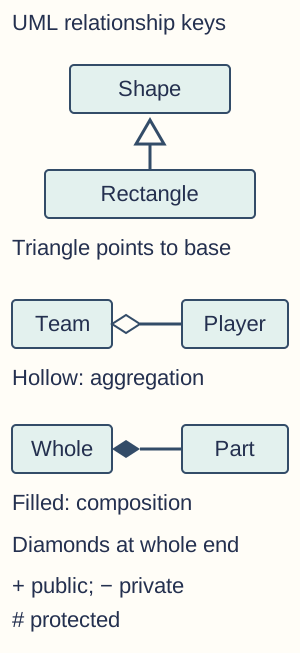
UML relationship conventions: a hollow generalisation triangle points to Shape, the base type. A hollow aggregation diamond is at Team, the whole, and a filled composition diamond is at the deliberately owning Whole. These generic composition roles do not assert a particular real system ownership policy. Visibility signs are + public, minus private and # protected; multiplicities must be supplied for a specific design. - Reading class diagrams — A class box can list its name, attributes with types and operations with parameters/result types, using +, − and # visibility. Multiplicities describe allowed relationship counts: 1 means exactly one and 0..* means zero or more. These are not current loop iteration values. Compare diagram promises with actual code rather than treating decorative arrows as implementation evidence.
- Encapsulate variation — Identify behaviour likely to vary and place it behind a stable boundary, so clients depend on what an operation promises. Prefer composing suitable components over forcing every reuse need into inheritance. This is a design principle to justify for the problem, not a ban on all inheritance.
- Program to an interface — Clients should depend on a suitable abstract contract rather than unnecessary concrete implementation details. AQA expects awareness of this principle; explicit interface programming is not a separately required practical-exam coding task under the stated scope. Still understand how a stable contract supports interchangeable implementations and test doubles without inventing assessed project requirements.
- Independent programming evidence — Being able to identify a keyword or select a trace result is not the same as writing and testing a procedural or object-oriented program. The full PLC demonstrations require constructing code, tracing state and calls, explaining diagrams and evaluating choices. Examples here are original teaching cases, not the current examination skeleton or a learner's assessed NEA.