 Mr Kidman's Classroom



Revise the key ideas
Threats and consequences
- Motives and unauthorised access — Attackers may seek money, confidential information, disruption, revenge, industrial advantage or the challenge. Unauthorised access means entering or using a system without permission; access to a colleague's account is not authorised merely because its password is known. Explain the data or service at risk and the route of entry in the given context.
- Viruses worms and Trojans — A virus attaches to a host file or programme and spreads when it runs; a worm can spread between systems without needing that host-file mechanism. A Trojan appears useful or legitimate but carries harmful behaviour. Infection may begin with an unsafe download or attachment. These are malware categories, not three names for the same method.
- Ransomware spyware and rootkits — Ransomware blocks access or encrypts data to demand payment; some attacks also steal data. Spyware secretly gathers information, such as browsing or keystrokes. A rootkit hides malicious activity or maintains privileged access. Paying a demand does not guarantee recovery or removal; prevention and tested recovery are needed.
Privileged access means high-level permissions, such as permission to change important system settings. It gives an attacker more control than an ordinary restricted account.
- Botnets and denial of service — A botnet is a set of compromised devices controlled together. It can send traffic in a distributed denial-of-service attack, overwhelming a service and making it unavailable. Denial of service targets availability and does not necessarily steal data. Lost bookings, downtime and recovery effort can still cause financial damage.
- Phishing and social engineering — Social engineering manipulates people into revealing information or taking unsafe actions. Phishing uses deceptive messages, texts or calls, often with urgency and a fake login or invoice. Verify a request through a known independent route and report it. A familiar logo or sender display name alone does not prove authenticity.
- Pharming and interception — Pharming redirects a user toward a fraudulent site, potentially despite a correctly typed address. A man-in-the-middle attack intercepts communication between parties. Shoulder surfing observes screens or input nearby. Check service identity, protect transmitted data and shield sensitive input; each defence addresses a different route rather than every threat.
- Internal threats — Employees can accidentally email the wrong recipient, deliberately leak files or bypass controls to save time. Portable storage, internet downloads and untrustworthy sites can introduce malware or take data outside managed systems. Train staff, restrict privileges and provide safe approved workflows. Internal does not mean deliberate, and trusted staff can still make errors.
- Consequences — A breach may cause lost or exposed data, damaged reputation, financial loss, reduced productivity, downtime and legal action. Link the consequence to the scenario: an unavailable booking service loses sales while an exposed membership list harms privacy. One incident can have several connected effects, extending beyond the immediate technical repair.
Layered protection
- Access controls — Locks restrict physical access; unique accounts and appropriate permissions restrict digital access. Use strong unique passwords and remove unneeded accounts. Biometrics identify a physical characteristic but require secure handling and alternatives. Two-factor authentication combines different factor types, such as a password and an authenticator device; two passwords are still one factor type.
A factor can be something you know, such as a password; something you have, such as an authenticator device; or something you are, such as a biometric characteristic.
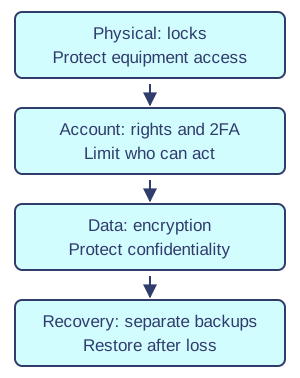
Layered controls address different risks. Original illustration. Open full-size diagram - Interface choices and hardening — Mask sensitive entry, lock unattended devices and avoid saved credentials or stay-logged-in features on shared machines. Autofill can improve speed but may disclose stored details. Hardening reduces attack opportunities by updating systems, removing unnecessary software, disabling unused services and setting secure defaults. Security depends on implementation and use as well as a control's presence.
- Firewalls and anti-malware — Hardware or software firewalls allow or block network traffic using rules; they do not establish that every allowed file is safe. Anti-malware scans or monitors for known signatures and suspicious behaviour and needs updates. Combine them with patching, training and access controls because each has limitations and new threats may evade detection.
A patch is a software update that fixes a particular problem, which may include a security weakness. Applying patches helps close known routes of attack.
- Encryption — Encryption transforms readable data into a form requiring the appropriate key to recover. Protect stored files or drives and transmitted data, such as with properly configured encrypted web connections. Encryption does not stop an authorised account from misusing decrypted information and cannot replace a backup. Protect keys separately and manage access to them.
- Backups and recovery — Back up defined files and configurations on a schedule matched to how much work can be lost. Keep protected, separate copies and test restoring them. A synchronised folder may reproduce deletion or encrypted files and is not automatically an independent backup. Recovery needs usable hardware, software, people and instructions as well as data copies.
- Finding weaknesses — Authorised penetration testing looks for weaknesses within a defined scope, with permission and reporting arrangements. Monitor logs and unusual system behaviour for signs of misuse. White-hat work is authorised; grey-hat activity may lack permission and should not be described as automatically ethical or legal. Finding a weakness does not authorise exploiting someone else's system.
Logs are records of system events, such as sign-ins, errors or changes. Authorised staff can compare them with expected activity when investigating a problem.
Policy and incident response
- Security policy — Define responsibilities, reporting routes, password requirements, approved software and usage, and hardening settings. Communicate the policy through induction, training and accessible reminders, and check it is followed. A rule that staff cannot practically follow encourages unsafe workarounds. Name the owner responsible for maintaining it and responding to concerns.
- Disaster recovery plan — State what is backed up, how often, on which media and where, who restores it and the required recovery timeline. Identify alternative premises or remote arrangements, replacement hardware, software and staff. Tell staff what to do and avoid during disruption. Test the plan and update it when systems or responsibilities change.
- Incident response — Investigate the nature and severity, respond by informing responsible people and appropriate authorities, contain the problem using authorised procedures, recover from a verified safe state, and analyse lessons. Preserve relevant evidence and follow the organisation's reporting process. Do not independently wipe a device or conceal an incident to avoid blame; this can obstruct recovery and investigation.
Policy and incident response
- Recovery rehearsal — A fictional office restores yesterday's backup to an isolated replacement machine and checks that records, application settings and permitted access work. Finding a backup file is only the first step; the team also needs software, instructions, responsible staff and time to recover. If the last valid backup is one day old, newer work may need reconstruction. Record the rehearsal's expected and actual results. Synchronisation alone may copy corrupted or encrypted data and cannot be assumed to provide an independent recovery point.


